Introduction to containers
Overview
Teaching: 10 min
Exercises: 0 minQuestions
What are containers for?
Who is using containers in HPC ecosystems?
Why do shared HPC systems use Singularity instead of Docker to run containers?
Objectives
Define the term: “container” in contrast to “virtual machine”
Define other terms, such as image and registry
Discuss when you would benefit from using containers in your workflow
Explain why Docker and Singularity have different roles in an HPC container workflow
What is a container?
A container is a way of running one or more applications in an isolated software environment. The applications, tools, libraries and configuration they need are packaged together in a container image.
Containers are used to distribute software with its dependencies, avoid conflicts between software environments and make workflows easier to reproduce and move between compatible systems. They can be used across personal computers, cloud platforms and HPC systems.
Containers vs Virtual Machines
If you understand the general concept of a virtual machine (VM), either on your own computer (for example, using VirtualBox) or through a cloud provider such as Azure, you’re already familiar with some of the concepts needed to understand containers.
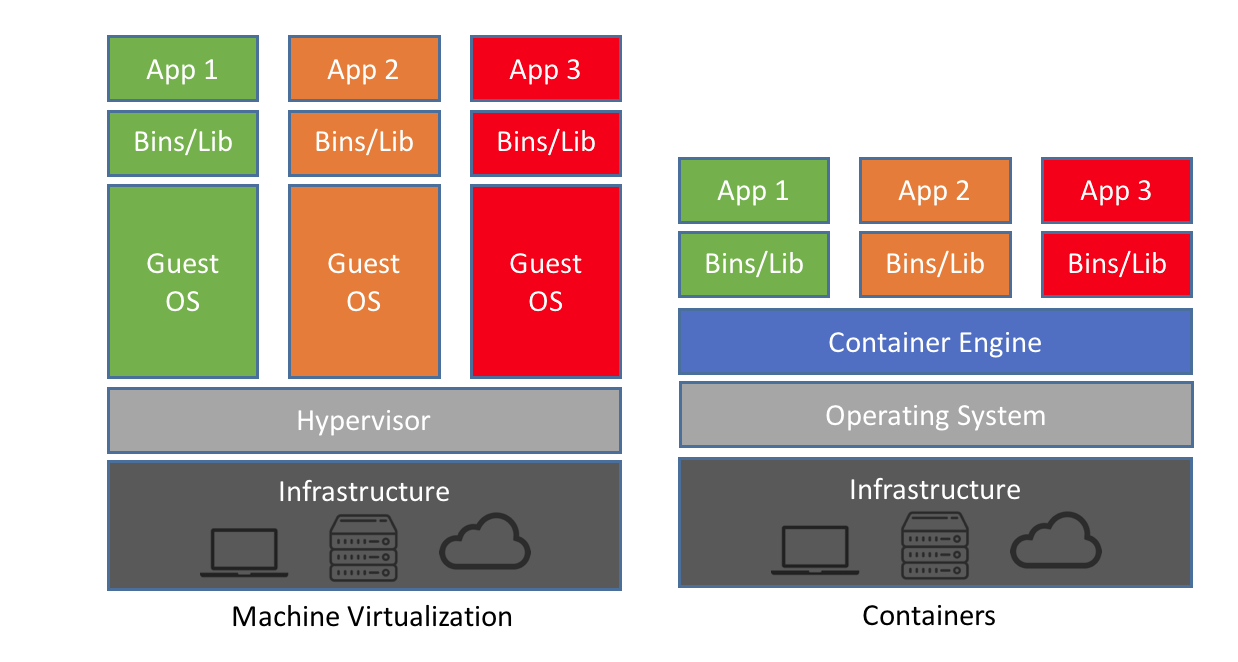
VMs and containers provide isolation in different ways. A VM behaves like a complete computer running inside another computer, with its own guest operating system and kernel. A container isolates processes but does not boot its own kernel. Instead, applications inside containers use the host system’s Linux kernel. (More generally, containers share the host system’s kernel rather than running their own.)
The container image supplies the user-space environment required by the application, including applications, tools, libraries and a filesystem.
By sharing the host kernel, containers are generally:
- lighter weight to run (less CPU and memory usage)
- faster to start
- smaller in size (thus easier to transfer and share)
Container images are also typically built as specialised software environments for a particular application or workflow. This specialisation is a usage convention rather than an architectural difference: an image can contain several applications and tools, but they usually serve a common purpose.
Because containerised applications use the host kernel and CPU architecture, they must be compatible with the host system. For example, Linux containers require a compatible Linux kernel, and an image built for an x86_64 CPU does not normally run on an arm64 system, or vice versa. (Cross-architecture execution may be possible through emulation, but it is generally not appropriate for HPC workloads.)
Why use containers?
There are a number of reasons for using containers in your daily work:
- Easier software installation and dependency management
- Users can often run software directly from a container image provided by developers or software vendors, without installing anything themselves.
- “I can’t get this software stack to install on the cluster” is often what drives people to containers.
- Cross-system portability
- Run the same software environment on your laptop, in the cloud and on HPC systems.
- Greatly reduces the “it works on my machine” problem.
- Software preservation and data reproducibility
- Preserve working software environments for months or years.
- Help ensure that analyses can be repeated using the same software environment.
- Revisit older projects after operating systems, libraries, compilers and tool versions on the host systems have changed.
- Simplified collaboration
- Share a complete software environment with collaborators.
- Then, avoid sharing lengthy installation instructions and configuration steps.
- Consistent testing environment
- Test software in an environment that closely matches where it will run.
- Reduce surprises caused by differences between systems.
A few examples of how containers are being used at Pawsey include:
-
Use of ready-to-use bioinformatics container images that package complex software dependencies, avoid difficult installations and preserve specific software versions for reproducible analyses
-
Greater control and reproducibility for radio astronomy and quantum computing software through project-managed containers with specific applications, dependencies, compilers and tool versions
-
Machine learning with ROCm-based TensorFlow and PyTorch images provided by AMD or Pawsey for multi-GPU workloads, with Pawsey images also supporting multi-node execution
-
Interactive data analysis using RStudio and Jupyter environments
-
OpenFOAM containers simplify installation, maintenance and customisation, including support for older versions that require legacy compilers and libraries
-
Reduced pressure on shared filesystems by handling large numbers of small files within container overlay filesystems (for example, ORCA, bioinformatics applications and Python software environments)
-
Simplified access to selected containerised applications, including bioinformatics tools, OpenFOAM, TensorFlow and PyTorch, through conventional software modules generated with Singularity Registry HPC (SHPC)
-
Pawsey-provided container images on Quay.io, including tested base images for building specialised containers and ready-to-use application images
Terminology
An image is a file (or set of files) that contains an application together with its software dependencies, libraries, tools, run-time environment and filesystem. Images can be copied, shared, uploaded and downloaded.
A container is a running instance of an image. In other words, it is a process that has been started from an image. Multiple containers can be launched from the same image, just as the same application can be run multiple times with different inputs or options.
In abstract, an image corresponds to a file, whereas a container corresponds to a process.
A registry is a service that stores and distributes container images. Registries can be public (for example, Docker Hub or Quay.io) or private. Users can download images from registries and, where permitted, upload their own images for others to use.
A container engine is software used to build and download container images and to start containers from them. Examples include Docker, SingularityCE and Apptainer.
To build an image, we normally use a recipe describing how the image should be assembled. Most recipes start from an existing image that provides a base software environment, and then specify the additional applications, libraries, tools and configuration to include. This recipe is called a Definition File (or def file) in the Singularity and Apptainer ecosystems, and a Dockerfile in the Docker ecosystem.
Container engines
A number of tools are available to create, distribute and run containerised applications. Some of these will be covered throughout this tutorial:
-
Docker: the most widely used container platform and image ecosystem. Docker is commonly used on personal computers, cloud systems and CI/CD platforms to build and distribute container images. Although Docker itself is not typically used directly on shared HPC systems, Docker/OCI images are commonly used as the starting point for HPC container workflows. See the extensive Docker documentation for more information.
-
SingularityCE: a container engine maintained by Sylabs and designed for HPC environments, allowing users to run containers without requiring elevated privileges. SingularityCE is the container engine used throughout this tutorial. See the SingularityCE documentation for more information.
Other container engines (not covered here) include:
- Podman: a daemonless, rootless container engine that is increasingly used as an alternative to Docker.
- Apptainer: the Linux Foundation-hosted open-source continuation of the original Singularity project, designed to remain largely compatible with SingularityCE workflows and SIF images.
- Shifter/Sarus: container runtimes designed for HPC systems with support for Docker-compatible images.
- Charliecloud: a lightweight container solution designed for HPC environments.
- Enroot: a lightweight container runtime developed by NVIDIA, commonly used for GPU-focused workloads.
Why use Singularity instead of Docker on an HPC system?
Containers share the host kernel, so the container engine’s security and privilege model matters on a shared system. A traditional, rootful Docker installation uses a daemon that normally runs with root privileges. Users who can control that daemon can request operations such as starting containers, mounting host directories and configuring devices. Providing unrestricted Docker access is therefore not equivalent to providing an ordinary application command; it can amount to highly privileged access to the host.
Docker also provides a rootless mode, in which the Docker daemon and containers run without root privileges by using Linux user namespaces. This mitigates the main security concern of the traditional Docker model. However, rootless Docker still requires additional host configuration and does not by itself provide all the scheduler, filesystem, network, MPI, GPU and multi-node integration expected on a large HPC system. Some HPC centres provide rootless OCI-compatible tools, particularly Podman-based solutions, but Singularity remains a common runtime because it was designed specifically for shared HPC environments.
This model can be acceptable on a developer-controlled computer, where the user already administers the machine. It is not appropriate as the general user-facing runtime on a shared supercomputer, where many users and workloads must remain isolated from one another. Running an application as root inside a container can also increase the consequences of a vulnerable or incorrectly configured application, especially when writable host directories, devices or additional privileges are exposed to it.
Singularity was designed for shared HPC environments. Normal execution does not require each user to control a privileged daemon, and containerised processes normally run with the invoking user’s host identity rather than becoming root. Singularity also integrates with host filesystems, resource managers, MPI libraries, GPUs and other HPC facilities.
This leads to the two-engine workflow used in this training:
Local computer                         Setonix
--------------                         --------
Docker builds and tests                Singularity runs
a Docker/OCI image          ------>    a converted SIF image

Developer-controlled system            Shared multi-user HPC system
Docker provides a widely used image-building ecosystem and layered Dockerfile workflow. A registry or transferred archive carries the resulting Docker/OCI image to Setonix, where Singularity converts it to SIF and runs it under the cluster’s security and integration model. The transfer and conversion add steps, but they allow each engine to be used for the role to which it is best suited.
Image formats
Most images distributed through registries such as Docker Hub and Quay.io use the container image structure standardised by the Open Container Initiative (OCI). OCI is an industry project that defines open standards for container images, their distribution through registries and their execution by compatible container runtimes. Modern Docker images are generally OCI-compatible, which allows them to be used by container engines other than Docker.
SingularityCE normally stores containers using the Singularity Image Format (SIF), commonly as a single .sif file. SingularityCE can pull Docker/OCI images from compatible registries and convert their contents into SIF for use with its native runtime. Therefore, an image published for Docker can often be pulled and used with SingularityCE, even though the original registry image and the resulting SIF file use different image formats.
Container registries
Most users do not create container images from scratch. Instead, they search for images prepared by software developers, research groups, collaborators or hardware vendors.
Container images are commonly published through online registries and container libraries. Public services include:
Organisations may also operate private registries for images intended for internal or restricted use. For example, NVIDIA publishes GPU-optimised AI and HPC images through the NVIDIA NGC Catalog, while AMD publishes official ROCm images through its ROCm organisation on Docker Hub.
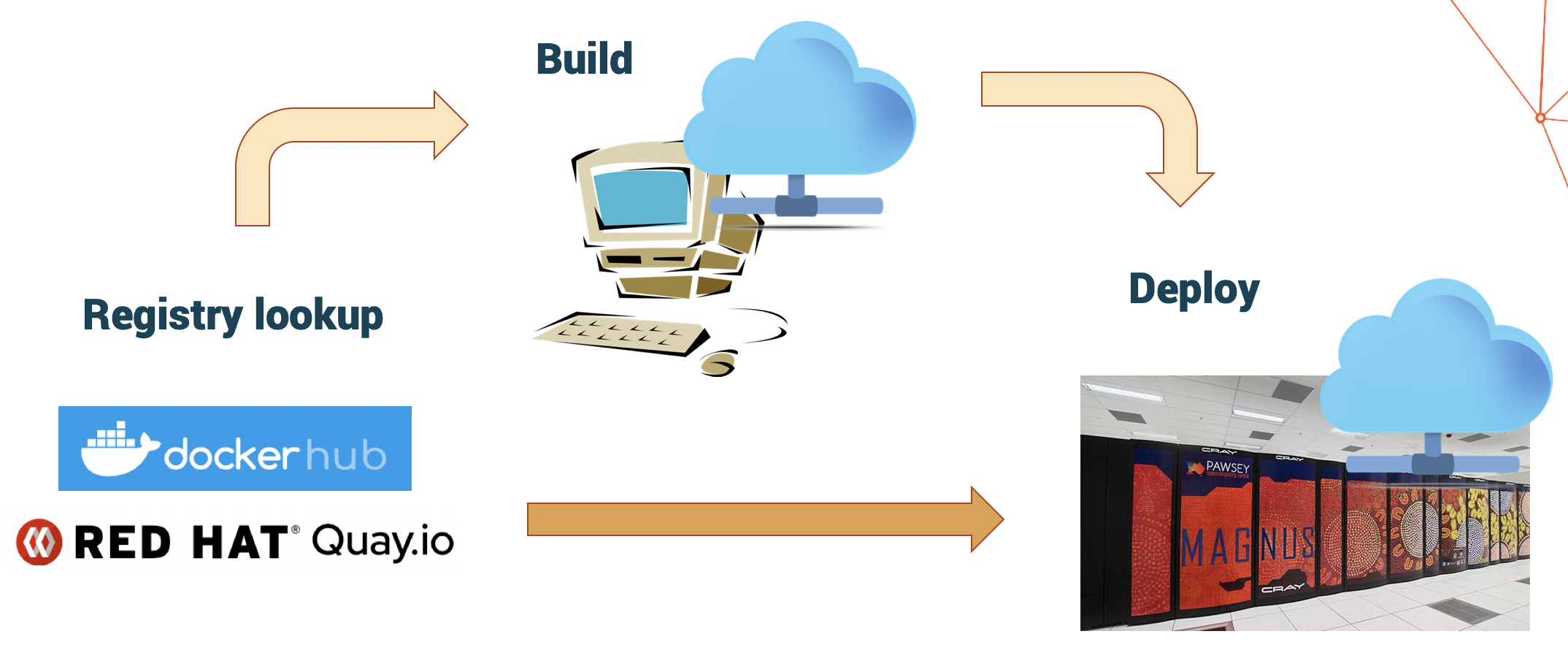
A common workflow is:
- Search a registry or container library for an existing image.
- Download (or pull) the image.
- Run the required software from the image.
If no existing image fully meets your requirements, you can use a suitable image as a base and build a customised image that includes the additional applications and configuration required for your workflow.
Get ready for the hands-on
Before continuing, please follow the instructions in the preparatory episode: Get ready on Setonix. It explains how to connect to Setonix and start downloading the large container images required later in this training.
Key Points
Containers allow users to run software directly from pre-built images provided by developers, vendors and collaborators.
Containers package applications together with their software environment.
Containers share the host system’s kernel instead of running their own.
Containers simplify software installation, portability and reproducibility.
Docker is commonly used to build images away from a shared HPC system, while Singularity runs them with the user’s normal identity on the cluster.